
- Spring IoC Container에 대한 설정을 변경한다.
- Spring Bean Configuration File 작성법을 배운다.
Web Application Context
Spring Web MVC에서 사용하는 IoC 컨테이너
IoC Container란 : 자바 객체(Bean)의 라이프 사이클(생성, 초기화, 서비스, 소멸)을 관리한다
Root Web Application Context와 Dispatcher Servlet
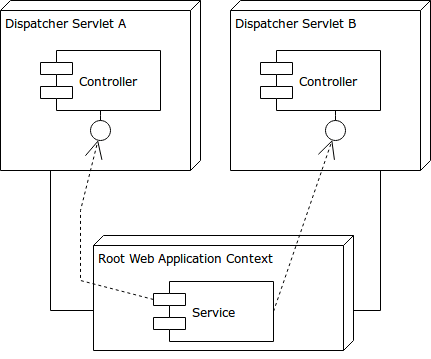
Root Web Application Context
Root Web Application Context에서는 공유 빈을 관리한다.
Services, Repositories와 같이 특정 Dispatcher에 귀속되지 않고 공유성이 강한 객체(Bean)을 관리한다.
Root에서 생성된 객체(Bean)은 모든 Dispatcher에서 사용이 가능하다. (의존성 주입이 가능하다)
Dispatcher Servlet
Dispatcher Servlet에서는 Controller, ViewResolver, HandlerMapping와 같이
특정 Dispatcher에 귀속되는 개별성이 강한 객체(Bean)를 관리한다.
WebApplicationContext 설정
1. Web.xml
공유 객체(Bean)를 관리하는 Root Web Application Context 설정
<context-param>
	<param-name>contextConfigLocation</param-name>
	<param-value>classpath:spring/root/*.xml</param-value>
</context-param>
<listener>
	<listener-class>org.springframework.web.context.ContextLoaderListener</listener-class>
</listener>
<context-param> : context에 parameter값을 설정
contextConfigLocation으로 xml 설정 파일의 경로를 지정한다.
Spring에서는 이 param Name으로 값을 확인하기 때문에 name은 변경할 수 없다.
<listener> : 사건이 발생 했는지 감시하는 감시자 역할
ContextLoaderListener :
어플리케이션이 시작하는 시점과 종료되는 시점을 감시한다.
WAS에서 deploy할 때와 undeploy할 때, contextConfigLocation으로 등록된 경로의 xml파일을 읽어 설정을 한다.
개별 객체(Bean)를 관리하는 DispatcherServlet 설정
<servlet>
	<servlet-name>appServlet</servlet-name>
	<servlet-class>org.springframework.web.servlet.DispatcherServlet</servlet-class>
	<init-param>
		<param-name>contextConfigLocation</param-name>
		<param-value>classpath:spring/dispatcher/*.xml</param-value>
	</init-param>
	<load-on-startup>1</load-on-startup>
</servlet>

<servlet-mapping>
	<servlet-name>appServlet</servlet-name>
	<url-pattern>/</url-pattern>
</servlet-mapping>
<servlet> : Servlet에 대한 설정
<servlet-name> : Servlet 이름
<servlet-class>org.springframework.web.servlet.DispatcherServlet</servlet-class> : DispatcherServlet으로 등록
<init-param> : init시의 parameter값을 부여
contextConfigLocation으로 xml 설정 파일의 경로를 지정한다.
Spring에서는 이 param Name으로 값을 확인하기 때문에 name은 변경할 수 없다.
<load-on-startup> : Servlet간에 load되는 순서를 지정
<servlet-mapping> : 특정 URL 경로에 대하여 접속할 Servlet을 연결
<servlet-name> : 연결할 Servlet 이름
<url-pattern> : 연결할 특정 URL 경로, 해당 경로 아래의 모든 URL에 대하여 해당 Servlet과 연결된다.
문자 인코딩 필터 설정
POST 방식의 요청 파라미터 문자값 UTF-8 인코딩
POST 방식 요청시, param 데이터에 한글이 있으면 인코딩 오류 때문에 데이터가 깨지게 된다.
이를 해결하기 위해 Character Encoding Filter를 등록해 요청이 들어오면 Filter를 통해 데이터를 UTF-8로 인코딩시킨다.
<filter>
    <filter-name>encodingFilter</filter-name>
    <filter-class>org.springframework.web.filter.CharacterEncodingFilter</filter-class>
    <init-param>
        <param-name>encoding</param-name>
        <param-value>UTF-8</param-value>
    </init-param>
</filter>
<filter-mapping>
    <filter-name>encodingFilter</filter-name>
    <url-pattern>/*</url-pattern>
</filter-mapping>
Root Web Application Context 설정
Servlet간의 공유성이 강한 객체(Service, Repository 등)를 관리하는 Root Web Application Context를 설정한다.
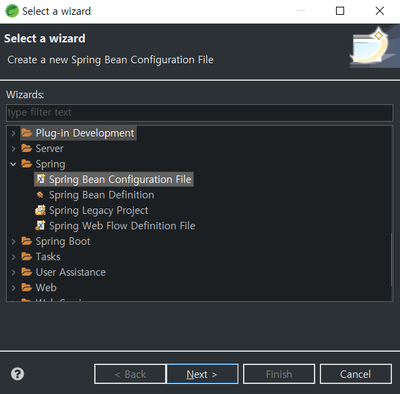
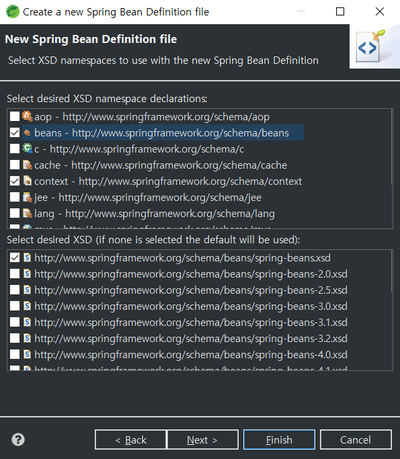
위에서 Root의 contextConfigLocation으로 설정한 경로에 Spring Bean Configuration File을 생성한다.
Namespaces에 beans와 context를 추가한다.
<?xml version="1.0" encoding="UTF-8"?>
<beans xmlns="http://www.springframework.org/schema/beans"
	xmlns:xsi="http://www.w3.org/2001/XMLSchema-instance"
	xmlns:context="http://www.springframework.org/schema/context"
	xsi:schemaLocation="
		http://www.springframework.org/schema/beans
		http://www.springframework.org/schema/beans/spring-beans.xsd

		http://www.springframework.org/schema/context
		http://www.springframework.org/schema/context/spring-context.xsd">

	<!-- @Service, @Repository가 적용된 클래스만 객체로 관리 -->
	<!-- base-package 이하의 모든 패키지, use-default-filters="false" defalut 기능(전체 어노테이션 생성)을 꺼버린다 -->
	<context:component-scan base-package="com.mycompany.webapp" use-default-filters="false">
		<context:include-filter type="annotation" expression="org.springframework.stereotype.Service"/>
		<context:include-filter type="annotation" expression="org.springframework.stereotype.Repository"/>
	</context:component-scan>

</beans>
xmls:"별칭" : 추가한 Namespaces 태그 라이브러리에 대한 코드 파일을 받을 수 있는 주소, 해당 태그를 <"별칭":>으로 사용하겠다는 의미.
별칭을 주지 않을 경우에는 태그 사용시 별칭을 안붙이고 사용할 수 있다.
xsi:schemaLocation : 태그 라이브러리에 대한 정보가 담겨있어 IDE에서는 이 파일을 바탕으로 intellisense 기능을 제공한다.
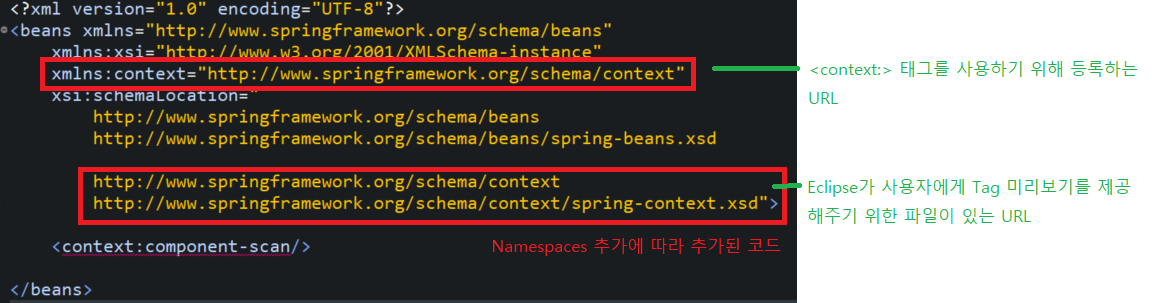
Root Web Application Context에서는 공유 객체(Bean)만 관리하기 위한 설정을 추가한다.
<context:component-scan> : 객체로 등록할 Annotation을 찾는다.
base-package="" : Annotation을 찾을 시작 패키지, 해당 경로 아래의 모든 패키지를 검색한다.
use-default-filters="false" : @Controller, @Service, @Repository, @Component 어노테이션을 자동으로 등록하는 기능을 꺼버린다.
공유 객체인 Service와 Repository만 등록하기 위해서이다.
<context:include-filter> : 해당 어노테이션을 발견하면 객체(Bean)로 생성한다.
Dispatcher Servlet 설정
Dispatcher의 개별성이 강한 객체 (Contoller 등)을 관리하는 개별 Dispatcher Servlet을 설정한다.
<?xml version="1.0" encoding="UTF-8"?>
<beans:beans xmlns="http://www.springframework.org/schema/mvc"
	xmlns:xsi="http://www.w3.org/2001/XMLSchema-instance"
	xmlns:beans="http://www.springframework.org/schema/beans"
	xmlns:context="http://www.springframework.org/schema/context"
	xsi:schemaLocation="http://www.springframework.org/schema/mvc https://www.springframework.org/schema/mvc/spring-mvc.xsd
		http://www.springframework.org/schema/beans https://www.springframework.org/schema/beans/spring-beans.xsd
		http://www.springframework.org/schema/context https://www.springframework.org/schema/context/spring-context.xsd">

	<!-- DispatcherServlet Context: defines this servlet's request-processing infrastructure -->
	<!-- Enables the Spring MVC @Controller programming model -->
	<annotation-driven />

	<context:component-scan base-package="com.mycompany.webapp">
		<context:exclude-filter type="annotation" expression="org.springframework.stereotype.Service"/>
		<context:exclude-filter type="annotation" expression="org.springframework.stereotype.Repository"/>
	</context:component-scan>
</beans:beans>
<mvc:annotation-driven /> : MVC 관련 어노테이션을 자동 인식 설정한다.
@RequestParam, @GetMapping, @PostMapping, @ModelAttribute를 자동 인식한다.
<context:component-scan> : 객체로 등록할 Annotation을 찾는다.
<context:exclude-filter> : 해당 어노테이션은 객체(Bean) 생성에서 제외한다.
<?xml version="1.0" encoding="UTF-8"?>
<beans xmlns="http://www.springframework.org/schema/beans"
	xmlns:xsi="http://www.w3.org/2001/XMLSchema-instance"
	xmlns:mvc="http://www.springframework.org/schema/mvc"
	xsi:schemaLocation="http://www.springframework.org/schema/mvc http://www.springframework.org/schema/mvc/spring-mvc.xsd
		http://www.springframework.org/schema/beans http://www.springframework.org/schema/beans/spring-beans.xsd">

	<!-- Handles HTTP GET requests for /resources/** by efficiently serving up static resources in the ${webappRoot}/resources directory -->
	<mvc:resources mapping="/resources/**" location="/resources/" />

</beans>
<mvc:resources> : Controller를 거치지 않아도 볼 수 있는 resources에 대한 경로를 지정한다.
mapping : URL 경로를 뜻한다. (http://xxxx.xxxx/resources/xxxx.jpg)
)
location : 프로젝트 내 webContent 이하의 파일 경로를 뜻한다.
'Develop' 카테고리의 다른 글
| [Spring JPA] JPA를 배워야하는 이유 (0) | 2022.05.13 |
|---|---|
| [Eclipse] Tomcat 에러, Serval port(8005, 8888) required by Tomcat 해결하는 법 (0) | 2022.05.11 |
| [디자인 패턴] 싱글톤 디자인 패턴(Singleton Design Pattern) (0) | 2022.04.28 |
| [Spring] properties 파일을 이용한 DI (0) | 2022.04.27 |
| [Spring] @Autowired, @Resource, @Inject의 차이 (0) | 2022.04.26 |